StageWhisper vs Granola: a private, on-device alternative
Granola is a really good AI notepad. It also keeps your meeting notes in its cloud and bills per seat, every month. StageWhisper runs the live part on your Mac, with the AI you already use, and you pay for it once.
Last updated June 2026. Based on Granola's public pricing and security pages.
The short version
Granola is the better buy for a team that shares notes in the cloud across Mac, Windows, and iPhone, with the usual integrations wired up for you.
StageWhisper suits the person who wants the transcript, the AI, and the call history on their own machine, running whatever model they already trust. A local one comes in the box if they want it, and there's no monthly bill to keep paying.
 StageWhisper
|
 Granola
|
|
|---|---|---|
| Joins the call as a bot | No | No |
| Transcription | On-device (Parakeet) | On-device |
| Where notes and transcripts live | On your Mac, encrypted | Granola's cloud |
| AI model | Bring your own AI | Cloud models (OpenAI, Anthropic) |
| Memory the AI draws on | Your assistant's, across your whole work | Your meetings inside the app |
| Live cue on your screen during the call | Yes | No |
| Reads your on-screen context | Yes, optional | No |
| Team sharing and integrations | Single-user | Notion, Slack, HubSpot, more |
| Platforms | macOS | macOS, Windows, iPhone |
| Source available | Free edition | No |
| Price | Free, or $99 once | Free tier, then from $14/user/mo |
The transcription already happens on your machine
Credit where it's due: Granola captures your system audio on the device, transcribes it locally, and never drops a bot into the call. Then the transcript and your notes go up to its cloud, the cleanup runs on third-party models like OpenAI and Anthropic, and the meter starts ticking at a seat a month.
The expensive part, turning speech into text, your Mac just did on its own. The monthly fee covers storage, the model calls, and syncing notes to a team. That's worth paying for if you're running a team on shared cloud notes. Plenty of people aren't, and they end up renting what their laptop already does for free.
What StageWhisper does differently
StageWhisper keeps the whole thing on your machine. The transcript comes off an on-device model, the notes save to your own disk as encrypted session files, and the audio never leaves the Mac. There's no fixed cloud vendor. You point it at whatever AI you already run, and a local Gemma model comes in the box, so you can stay fully offline if that's what you want.
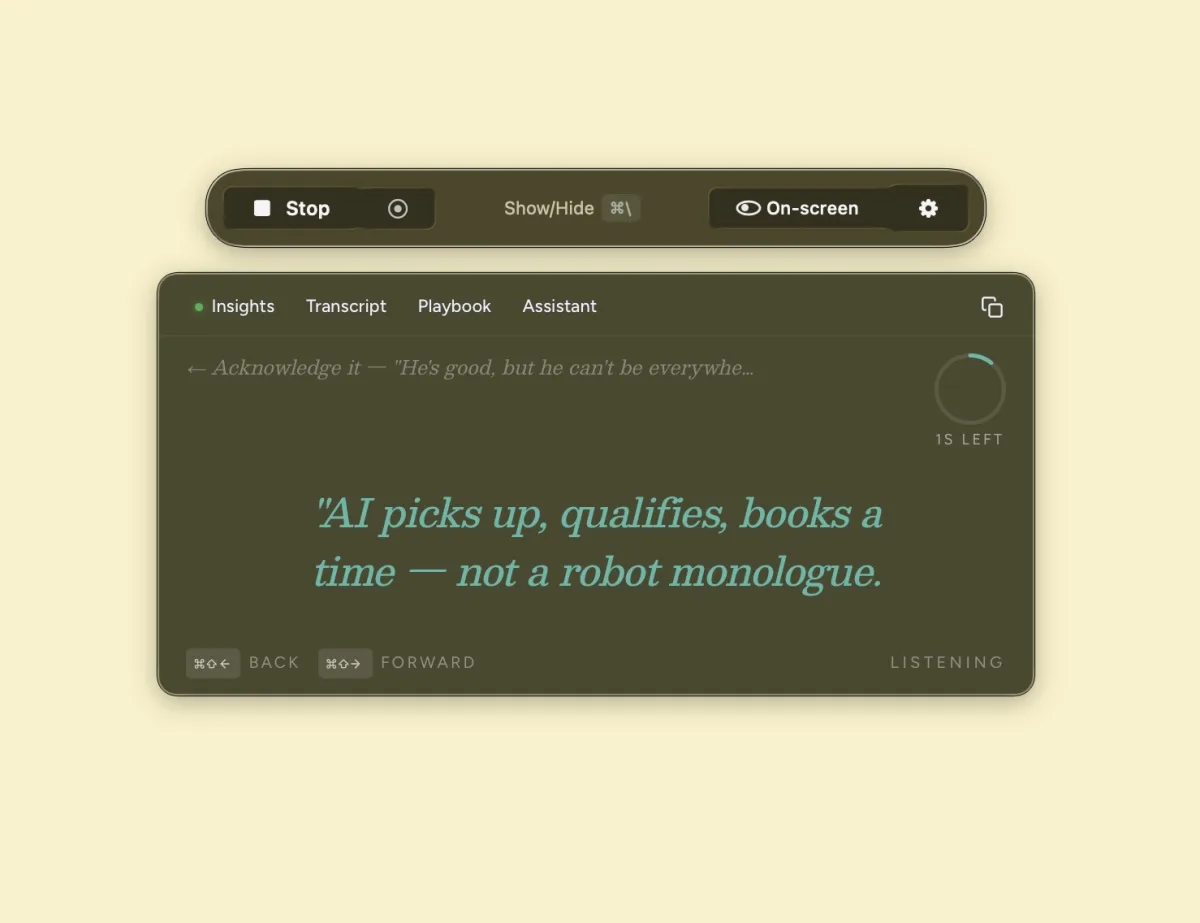
It also helps you while you're still on the call. A short cue shows up on your screen mid-conversation, only you see it, and you put it in your own words. Flip on screen context and it reads the doc or the code you're looking at and factors that in too. Granola hands you a tidy summary once everyone has hung up, which is useful, but by then the decision you needed help with has already been made.
Your assistant should already know your business
Most of these tools handle the AI the same way. They bolt a generic model onto the app, so it walks into every call knowing nothing about you. Granola works like that. A handful go further and build their own in-house assistant, but even then it only lives inside their product and never sees the rest of your work. Either way you're left with an assistant stuck in one app.
What you want is one assistant that lives somewhere you control, a cheap VPS does the job, and that you can reach from anywhere. It already knows your business, because it's the same assistant running your email, your docs, and the rest of your day. StageWhisper just gives it a way into your calls. Run something like OpenClaw or Hermes and it's already keeping a memory of everything it does with you. StageWhisper drops the call into that memory and pulls from it live, so the nudge on your screen comes from an assistant that already knows the account. And every call it sits in on leaves it better briefed for the next one.
Where each one is the better choice
Granola fits better when
- A whole team needs to share notes, synced in the cloud.
- You're on Windows, or you want it on your phone too.
- You want Notion, Slack, and HubSpot wired up out of the box.
- You'd rather not think about which AI runs it. Granola handles that for you.
StageWhisper fits better when
- The calls are sensitive or regulated, and transcripts in someone else's cloud are a non-starter.
- You already run your own AI agent and want it in the room with you.
- Nothing should leave the machine, so a local model is the whole point.
- Paying once beats paying every month for something your laptop half-does already.
Common questions
Does Granola or StageWhisper join my call as a bot?
Neither. Both capture your computer's own audio, so nothing extra shows up in the participant list and no notetaker dials in.
Is Granola local and private?
Granola transcribes on your device and says it does not store the audio. Your transcripts and notes are stored in Granola's cloud and enhanced by third-party models such as OpenAI and Anthropic. StageWhisper keeps the transcript, the notes, and the model on your own machine.
Can I use my own AI model with Granola?
Granola does not advertise a bring-your-own-model option on its plans. StageWhisper is built around running the assistant you already use, and it ships with a local Gemma model so you can keep everything on-device.
How much does each one cost?
Granola has a free tier with limited history and paid plans from $14 per user per month. StageWhisper has a free edition and a one-time Founders license at $99, with no subscription.
Which platforms do they run on?
Granola runs on macOS, Windows, and iPhone. StageWhisper is macOS first.
Keep your calls on your own machine
Lite is free and stays on your Mac. Founders adds the live cue, the on-screen context, and a memory of every call you take, for a single payment instead of a monthly bill.